Celemony MELODYNE EDITOR 2 with DNA *Direct Note Access* - (Mac/Win)
€
144
$
168


Favourite Auctions
To save auctions to your favourites, please login
If you don't have an account, please register
Description
- MELODYNE EDITOR 2.1.2 with DNA *Direct Note Access* -
BRAND NEW!- GENUINE FULL VERSION!
(NOT EDUCATED/OEM/COPY/UPGRADE VER.)
overview
Melodyne Audio Editor for Polyphonic material
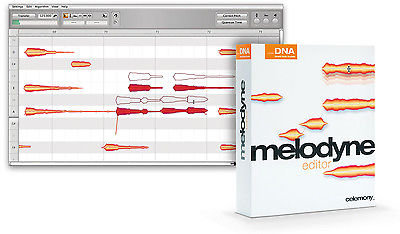
Melodyne Editor offers the revolutionary Direct Note Access technology. This makes possible what had previously been considered impossible: access to individual notes in polyphonic audio material. Correct wrong notes in a piano recording; change the chords in a guitar accompaniment after the recording is over; refashion a sample lick. Melodyne editor lets you do things of which, until now, you could only dream.
With Melodyne editor you can edit your audio material in an intuitive and flexible way. Simply move an audio note to a different pitch or a different position. Make notes longer or shorter, louder or softer. Delete notes from chords or add new ones by copying. Transpose or quantize your material, create from it melodic, harmonic and rhythmic variations. Once you’ve experienced the power to reshape audio in this way, you won’t want to live without it.
Highlights
- Fully 64-bit compliant
- Single-track audio editing environment with Melodyne technology
- Suitable for monophonic, polyphonic and rhythmic/complex audio material
- Offers with DNA direct access to individual notes within chords
- Activation on up to two computers or via iLok
- Manual or automatic correction of intonation and timing errors
- Refashioning of melodies, harmonies, timing and rhythm
- Transposition including adjustment to scale
- Modifying various note parameters such as volume, vibrato, formant spectrum
- Pitch shifting and time stretching
- Re-Quantization
- MIDI file export
- Shape audio as never before
- Unique and award winning
- Edit music and not just audio data
- Best sound, best reputation, best of company
- The future of audio
- applications
- First take: final take
- Perfect vocals
- Perfect timing
- Harmonies and tunings à la carte
- Sound library reloaded
- Design the details
- No detours
Features
- single-track audio editing environment with Melodyne technology
- suitable for monophonic, polyphonic and rhythmic/complex audio material
- offers with DNA direct access to individual notes within chords
- works as a plug-in (VST, AU, RTAS) in compatible DAWs under Mac OS X and Windows
- can also be used in stand-alone mode
- can also be connected via Rewire to compatible DAWs
- supports ARA Audio Random Access in compatible DAWs
- activation on up to two computers or via iLok
- user interface and manual in English, German, French, Spanish and Japanese
- manual or automatic correction of intonation and timing errors
- refashioning of melodies, harmonies, timing and rhythm
- transposition including adjustment to scale
- creation and editing of scales, extraction of scales from recordings
- modifying various note parameters such as volume, vibrato, formant spectrum
- in-depth editing of the timing of notes
- pitch shifting and time stretching
- (re-)quantization
- MIDI file export
In the case of monophonic (solo voice, saxophone, bass guitar...) and polyphonic (piano, guitar...) audio material, the following possibilities exist for editing notes:
- modifying the pitch
- modifying the pitch drift
- modifying the pitch modulation
- modifying the position
- modifying the length
- modifying the attack speed
- modifying the time course within notes
- modifying the volume
- shifting the formant spectrum
- modifying the pitch of any transition between notes
- modifying the volume of any transition between notes
- shifting the formant spectrum of any transition between notes
- timing (re-)quantization, manually or via macro
- pitch quantization, manually or via macro
- cut, copy and paste
Rhythmic and complex material
In the case of rhythmic and complex material, separation is according to beats, so if several notes (e.g. click and snare) sound on the same beat, they are available for editing in the shape of one Melodyne blob only. For such blobs, the following editing possibilities exist:
- modifying the pitch (relative)
- modifying the position
- modifying the length
- modifying the volume
- modifying the attack speed
- modifying the time course within notes
- shifting the formant spectrum
- modifying the volume transition between blobs
- shifting the formant spectrum of transitions between blobs
- timing quantization, manually or via macro
- cut, copy and paste
==================================================================================================================================================================================== Frequently asked questions about software downloads
Our download option is a great way to get your software fast with no shipping fees. After you purchase, we'll send you an email with download instructions. Because of the large size of most software, a high speed internet connection is recommended. Some frequently asked questions are listed below.
Question: Is the download the same as the boxed product?
Answer: Yes. The software is 100% identical.
Question: Will I receive a registration code to activate the software?
Answer: Yes. If the software requires a code, we'll email it to you as soon as possible.
Question: Can I get technical support and upgrades if needed?
Answer: Yes. Your download will be provided by the manufacturer and will include the same license, warranty, support and upgrades as the boxed software.
Question: Will I get an instruction manual with the software?
Answer: Yes. Downloads often include a manual in PDF format or instructions will be built into the software.
Question: If my computer crashes or if I get a new computer, will I be able to redownload the software?
Answer: Yes. You will always have the opportunity to redownload if you have a problem. We also recommend that you make a backup copy for safe keeping.
====================================================================================================================================================================================
System Requirements
- Dual (Core) PowerPC G5 , Intel, or AMD Dual Core processor
- 2 GB RAM
- Mac OS X 10.4 or later or Windows XP, Vista, 7 or 8
- ASIO-compatible audio hardware
- Works as a plug-in (VST, AU, RTAS) in compatible DAWs under Mac OS X and Windows
- May be used in stand-alone mode
ITEM CONDITION :
- Condition: Brand New - Authorized Download
- Series: Software
- Publisher: Celemony
- Format: Download
PAYMENT & CHECK OUT
-We Only Accept Paypal For Safety & Secure Transaction!-
*You can start using the software immediately since your purchase!*
Delivery !
- FAST ELECTRONIC DELIVERY! LICENSE AUTHORIZATION & OFFICIAL DOWNLOAD LINK SENT DIRECTLY TO YOUR PAYPAL EMAIL ADDRESS ONCE THE PAYMENT RECEIVED ! (No Box/CD/shipping)
- No Shipping Fees! - Since this is a download delivery, you pay nothing extra to receive it.
- No Sales Tax - We are only required to charge tax to MA residents. All other buyers will not pay tax.
If you Have Any Question Feel Free To Contact Me Through Message
Is Our PRIMARY GOAL ....!
price rating


![Blast Tyrant - CLUTCH [2x LP]](https://www.popsike.mobi/php/thumbnail.php?url=https://www.popsike.pics/pix/20151127/172011862167.jpg)